If you ever tried to enable Hyper-V Replication on a host that is part of a Failover Cluster, you probably hit the wall of “you need a Hyper-V Replica Broker role first”. That is fine in classic clusters, but it is not always an option, specially in single-node clusters or clusters created with Administrative Access Point set to None. The good news is that you can still enable Hyper-V Replication with Failover Clustering enabled, and this post will guide you on how to do that.
Why bother? Because many modern cluster designs (S2D single-node clusters, AAP=None clusters, lab and edge deployments) do not have a Cluster Name Object in Active Directory, so a Replica Broker simply cannot exist. The official documentation pretty much assumes you do have one, so this scenario is not very well covered out there. If you have never touched Hyper-V Replica before, this is also a good chance to look into it.
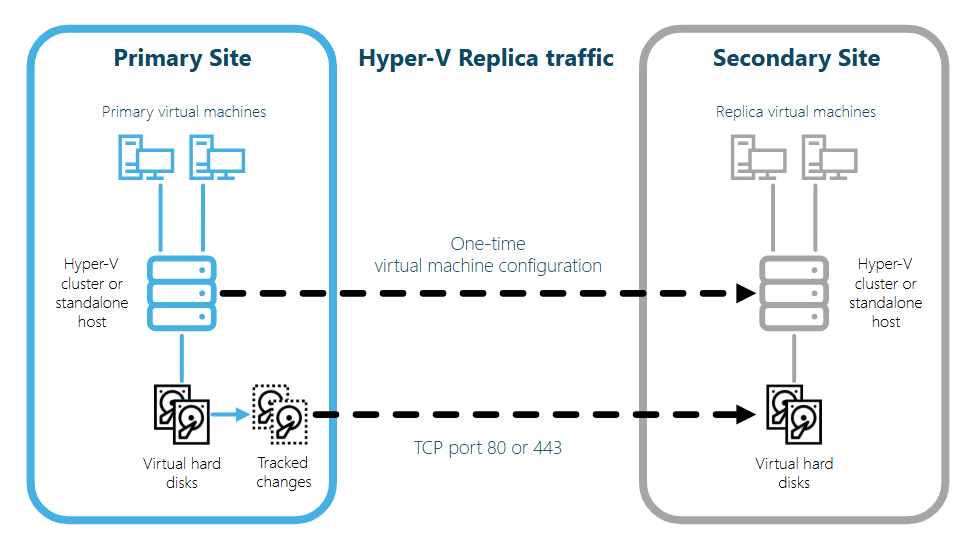
The post will focus on the WMI provider Msvm_ReplicationService, which is part of the root\virtualization\v2 namespace. This provider respects a registry flag called IsBrokerOptional and let you create the replication relationship directly, bypassing the Replica Broker requirement that the PowerShell cmdlets enforce.
Continue reading

Recent Comments