wiliammbr's blog

Some thoughts on programming stuff

Enable Hyper-V Replica on Failover Clustering without a Broker

If you ever tried to enable Hyper-V Replication on a host that is part of a Failover Cluster, you probably hit the wall of “you need a Hyper-V Replica Broker role first”. That is fine in classic clusters, but it is not always an option, specially in single-node clusters or clusters created with Administrative Access Point set to None. The good news is that you can still enable Hyper-V Replication with Failover Clustering enabled, and this post will guide you on how to do that.

Why bother? Because many modern cluster designs (S2D single-node clusters, AAP=None clusters, lab and edge deployments) do not have a Cluster Name Object in Active Directory, so a Replica Broker simply cannot exist. The official documentation pretty much assumes you do have one, so this scenario is not very well covered out there. If you have never touched Hyper-V Replica before, this is also a good chance to look into it.
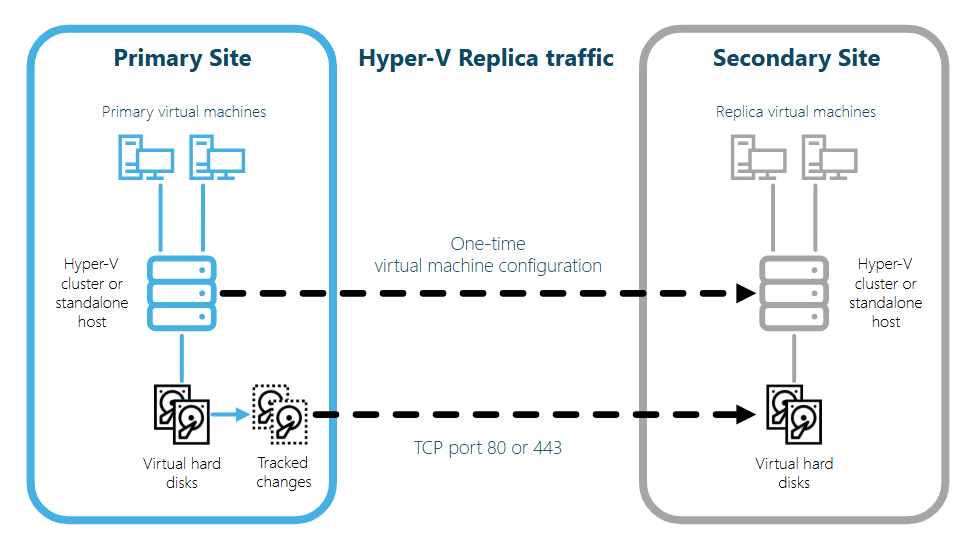
Hyper-V Replica with Failover Clustering - Enable Hyper-V Replication on Failover Clustering hosts without a Replica Broker

The post will focus on the WMI provider Msvm_ReplicationService, which is part of the root\virtualization\v2 namespace. This provider respects a registry flag called IsBrokerOptional and let you create the replication relationship directly, bypassing the Replica Broker requirement that the PowerShell cmdlets enforce.

Continue reading

Auto archive items in SharePoint using Power Automate

SharePoint lists may grow bigger with time, that’s no doubt. Depending on your user base, you might start to feel performance issues after a few thousands of items created. That’s why it should be good for you to looking after auto archive items in SharePoint using Power Automate.

Why Power Automate? It is a great tool with seamless integration with SharePoint which allows you to reduce the toil and generate value by automating tasks. If you haven’t checked Power Automate before, it is a good opportunity to start looking into the Low Code world.

Continue reading

Publish messages to RabbitMQ with .NET Core

RabbitMQ has became one of the most used message brokers in the world, so this is not a surprise if you come to a situation where you need to publish messages to RabbitMQ with .NET Core. This approach allows you to create asynchronous communication and better scalability depending on your architecture. But before we move ahead, it is important to explain a few things.

As per Wikipedia, “RabbitMQ is an open-source message-broker software that originally implemented the Advanced Message Queuing Protocol and has since been extended with a plug-in architecture to support Streaming Text Oriented Messaging Protocol, MQ Telemetry Transport, and other protocols”. It works mostly as a middleware for message handling.

RabbitMQ Logo - Publish messages to RabbitMQ with .NET Core
RabbitMQ Logo

The post will explore the features published and maintained in the RabbitMQ Client library. This library can be found in GitHub. The client, of course, is integrated or imported using NuGet via Visual Studio or NuGet CLI.

Continue reading

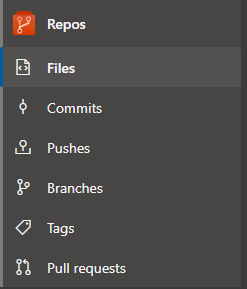
Repos menu in Azure DevOps

This blog post covers the possible features on the Repos menu in Azure DevOps. The Repos menu basically allows you to navigate through your code and the activities related to maintaining the life cycle of your application code and assets.

If you are looking for a different post related to Azure DevOps menu, as you know, we have this series of posts related to Azure DevOps features where we deep dive into some of them. Maybe you will find them useful to learn more.

Here we have available the possible pages you may be interested in checking:

Repos menu - Repos menu in Azure DevOps
Repos menu
Continue reading

Auto archive files in SharePoint with Power Automate

A pretty common use case scenario where you might want to auto archive files in SharePoint with Power Automate. Sometimes it is important to move some files from one place to other, reducing the size of a library and the number of rows returned in a search. You can always explore the retention policies available out-of-box in SharePoint, of course. But sometimes this feature can present some problems depending on the content type or data type you are working with.

So if you have the option to work with Power Automate, why not using it? Power Automate is great when you need to automate one specific task and it is a very intuitive to use. It is fully integrated with SharePoint and you can take advantage of its connectors to do your tasks.

Continue reading

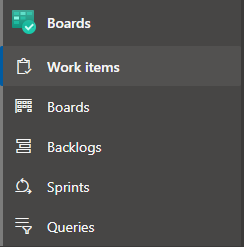
Boards menu in Azure DevOps

This blog post covers the possible features on the Boards menu in Azure DevOps. The Boards menu basically allows you on managing your work, reporting activities and progress, and of course, planning and project tracking.

If you are looking for a different post related to Azure DevOps menu, as you know, we have this series of posts related to Azure DevOps features where we deep dive into some of them. Maybe you will find them useful to learn more.

Here we have available the possible pages you may be interested in checking:

Boards menu - Boards menu in Azure DevOps
Boards menu
Continue reading

Read work item data from Azure DevOps with C#

Azure DevOps is a powerful tool for managing and tracking software development progress. Even more than that, it also does a bunch of other useful things like the Azure Boards feature that, in my opinion, are among the best. Consequently, focusing on the work item design, this blog post discusses how to read work item data from Azure DevOps with C#. This might be useful to you if you want to consume data from Azure DevOps and use it to integrate with other systems.

Add, update, & follow stories, issues, bugs, & other work items - Azure  Boards | Microsoft Docs
Work items in Azure DevOps (Microsoft Docs)
Continue reading

Execute non-query on Sybase database in C#

This post will help you if you want to execute non-query on Sybase database in C# like an UPDATE, CREATE, DELETE or others. The idea here is to explore the NuGet package AdoNetCore.AseClient as the connection driver for the database.

For some historical background, as per Wikipedia: “Sybase, Inc. was an enterprise software and services company that produced software to manage and analyze information in relational databases, with facilities located in California and Massachusetts. Sybase was acquired by SAP in 2010; SAP ceased using the Sybase name in 2014. “

Sybase Logo - Run query on Sybase database with C#
Enterprise software for managing relational databases (Wikimedia Commons)
Continue reading

Run query on Sybase database with C#

This post will help you if you want to run query on Sybase database with C# like common SELECT scripts. The idea here is to explore the NuGet package AdoNetCore.AseClient as the connection driver for the database since this is extremely similar to other common database access libraries.

Nowadays, with more and more different applications coexisting and integrating between themselves, the technology you work is not barrier. You can connect to different datasource with the language you prefer thanks to the community!

Sybase Logo - Run query on Sybase database with C#
Enterprise software for managing relational databases (Wikimedia Commons)
« Older posts

© 2026 wiliammbr's blog

Theme by Anders NorenUp ↑