If you ever tried to enable Hyper-V Replication on a host that is part of a Failover Cluster, you probably hit the wall of “you need a Hyper-V Replica Broker role first”. That is fine in classic clusters, but it is not always an option, specially in single-node clusters or clusters created with Administrative Access Point set to None. The good news is that you can still enable Hyper-V Replication with Failover Clustering enabled, and this post will guide you on how to do that.
Why bother? Because many modern cluster designs (S2D single-node clusters, AAP=None clusters, lab and edge deployments) do not have a Cluster Name Object in Active Directory, so a Replica Broker simply cannot exist. The official documentation pretty much assumes you do have one, so this scenario is not very well covered out there. If you have never touched Hyper-V Replica before, this is also a good chance to look into it.
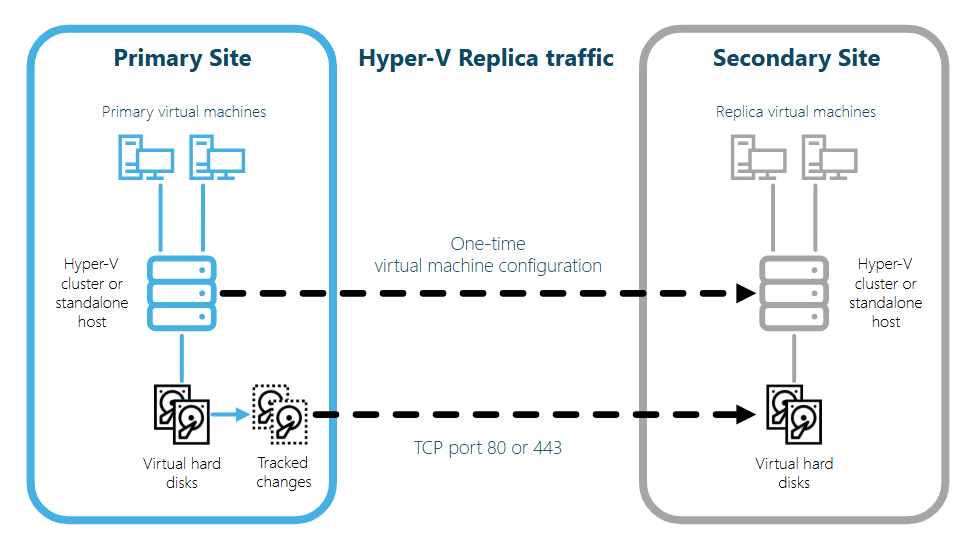
The post will focus on the WMI provider Msvm_ReplicationService, which is part of the root\virtualization\v2 namespace. This provider respects a registry flag called IsBrokerOptional and let you create the replication relationship directly, bypassing the Replica Broker requirement that the PowerShell cmdlets enforce.
Prerequisites before you enable Hyper-V Replication on a clustered host
- Both primary and replica hosts must have the Hyper-V and Failover Clustering roles installed;
- Both hosts must be reachable via DNS by FQDN, and the Hyper-V Replica HTTPS port (default 443, custom is fine) must be open between them;
- A machine certificate must be present on each host for Certificate-based authentication, and the certificate must be trusted on the other side;
- The cluster should be created with -AdministrativeAccessPoint None when there is no CNO in AD, otherwise cluster WMI calls will route through root\MSCluster and break the broker-less flow;
- The account running the configuration needs local admin rights on both hosts.
Configuring the host for broker-less replication
The first step is to tell VMMS that the Replica Broker is optional. This is done with a single registry value on every clustered host that will participate in replication. After setting it, the Hyper-V Virtual Machine Management service (vmms) needs to be restarted so the flag is picked up.
$regPath = 'HKLM:\Software\Microsoft\Windows NT\CurrentVersion\Virtualization\Replication'
if (-not (Test-Path -Path $regPath)) {
    New-Item -Path $regPath -Force | Out-Null
}
Set-ItemProperty -Path $regPath -Name 'IsBrokerOptional' -Value 1 -Type DWord

Restart-Service -Name vmms -Force
In this part, we just create or update the IsBrokerOptional DWord and restart vmms. This must be done on the primary AND on the replica host. If you skip the restart, VMMS will keep using the cached value and your next steps will still complain about the missing broker.
Validating the cluster Administrative Access Point
Before going further, confirm the cluster was created with AAP=None. When AAP is set to Dns or ActiveDirectory, the Hyper-V cmdlets and WMI calls start routing through the cluster WMI namespace, which expects a Cluster Name Object and a Replica Broker. That is exactly what we are trying to avoid.
(Get-Cluster).AdministrativeAccessPoint
If the result is anything other than None, you will need to recreate the cluster with the correct flag. There is no online way to change AAP after the cluster is created.
Registering the VM as a clustered (HA) role
Here is the part that is missing in most blog posts: setting IsBrokerOptional=1 only waives the broker requirement, it does NOT waive the rule that the VM itself must be highly available. Internally, VMMS still calls IsVmInCluster before allowing CreateReplicationRelationship to run. So every VM you want to replicate must be added as a cluster role first.
Add-ClusterVirtualMachineRole -VirtualMachine 'MyVM01'
If the VM is already a cluster role, the command throws “already highly available”, which is safe to ignore. After registering at least one new VM, restart vmms again so the FrUtilities cluster cache is refreshed. Yes, vmms restart appears twice in this flow, that is by design.
Enabling the Hyper-V Replication relationship
Now we have all conditions met: IsBrokerOptional is on, AAP is None, the VM is HA. The standard Enable-VMReplication cmdlet still refuses to run on a clustered host without a broker, so we go through the WMI provider directly. The example below uses CIM cmdlets, which work even under PowerShell Constrained Language Mode and do not require any static .NET method calls.
$vmName     = 'MyVM01'
$replicaSrv = 'replica-host01.contoso.com'
$port       = 443
$thumbprint = 'AABBCCDDEEFF...'   # machine cert thumbprint on this host

$ns  = 'root/virtualization/v2'
$svc = Get-CimInstance -Namespace $ns -ClassName Msvm_ReplicationService
$vm  = Get-CimInstance -Namespace $ns -ClassName Msvm_ComputerSystem -Filter "ElementName='$vmName'"

$rsd = New-CimInstance -Namespace $ns -ClassName Msvm_ReplicationSettingData `
        -ClientOnly -Property @{
            RecoveryConnectionPoint   = $replicaSrv
            RecoveryServerPortNumber  = [uint16]$port
            AuthenticationType        = [uint16]2     # 2 = Certificate
            CertificateThumbPrint     = $thumbprint
            CompressionEnabled        = $true
            ReplicationInterval       = [uint16]300   # seconds
            RecoveryHistory           = [uint16]0
            AutoResynchronizeEnabled  = $true
        }

# Build the WMI DTD 2.0 XML for the embedded instance and call the method
$rsdXml = ([wmi]"\\.\root\virtualization\v2:Msvm_ReplicationSettingData").GetText('CimDtd20')

Invoke-CimMethod -InputObject $svc -MethodName CreateReplicationRelationship `
    -Arguments @{
        ComputerSystem      = $vm
        ReplicationSettings = $rsdXml
    }
This last step calls CreateReplicationRelationship on the primary host. The replica host does not need any per-VM call: it will receive the request, create the replica VM and start the initial replication. If you get error 32414 (“could not make Replica virtual machine a clustered resource”), it usually means the replica host has an orphan cluster group from a previous attempt. Remove it with Remove-ClusterGroup -RemoveResources -Force on the destination and try again.
Conclusion
That is it! Once you understand that the Replica Broker requirement is not a hard rule but a check that VMMS does on top of WMI, you can enable Hyper-V Replication with Failover Clustering enabled even without a CNO. The recipe is always the same: IsBrokerOptional=1, AAP=None, VM as HA role, then call Msvm_ReplicationService directly. You can also add monitoring on top of it by querying ReplicationHealth from the same WMI namespace. Anyways, I hope you are able to enable Hyper-V Replication on Failover Clustering hosts without a Replica Broker after checking this post. Also you might find useful checking other posts related to Hyper-V here.
References:
- Msvm_ReplicationService class – https://learn.microsoft.com/en-us/windows/win32/hyperv_v2/msvm-replicationservice
- Msvm_ReplicationSettingData class – https://learn.microsoft.com/en-us/windows/win32/hyperv_v2/msvm-replicationsettingdata
- Hyper-V Replica overview – https://learn.microsoft.com/en-us/windows-server/virtualization/hyper-v/manage/set-up-hyper-v-replica
- Failover Clustering AdministrativeAccessPoint – https://learn.microsoft.com/en-us/powershell/module/failoverclusters/new-cluster


Leave a Reply