If you have to embed a Power BI report to a SharePoint Online Classic Page, then just go for the iFrame approach. Power BI offers a “Publish to web” feature that helps you on embedding reports easily. Although it’s not so interactive and have some limitations (can’t use Query string filtering), it still works well and offers some parameters like the possibility to set default page in Publish to web from Power BI.
We are going to cover the steps for embedding and setting a default page for our report!
This post will cover a solution for a new problem related to SPFx solutions not showing in Apps in SharePoint On Premises. Before diving in the troubleshooting, let me give you some context!
In September 2017, Microsoft announced support to the SharePoint Framework in the (not so new) SharePoint 2016. It is a great feature that will let developers explore the new framework in the cloud and on premises, allowing them to embrace the new modern era of SharePoint with SPFx apps.
Also, if you don’t know anything about the SharePoint Framework, please read this guidance to get in touch with the new trends for SharePoint Development.
When a list is not necessary anymore, you may need to delete it. So how to delete a SharePoint list? This tutorial will help you on deleting that list! Oh, needless to say that you can restore it from the Recycle bin if you want, for a period of time.
According to Microsoft documentation, the sites objetive can be described like the paragraph below:
“A list in SharePoint is a collection of data that gives you and your co-workers a flexible way to organize information.Add columns for different types of data, such as text, currency, or multiple choice. Create views to display data effectively. Sort, group, format and filter lists to highlight the most important information. A list can include people, links, pictures, dates, and more. Track history of a list item over time with versions and use Microsoft Flow to automate processes.Unlike SharePoint document libraries, lists are not created by default when you create a site. Add them wherever you need to.”
Excluding a list in Modern interface in SharePoint
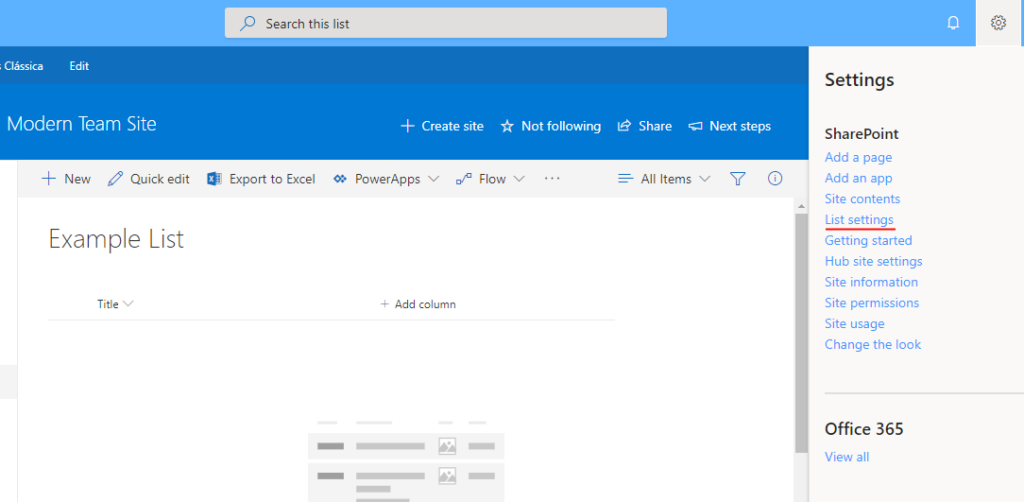
First you must be inside the SharePoint list;
After click in the Settings button;
Click in List settings;
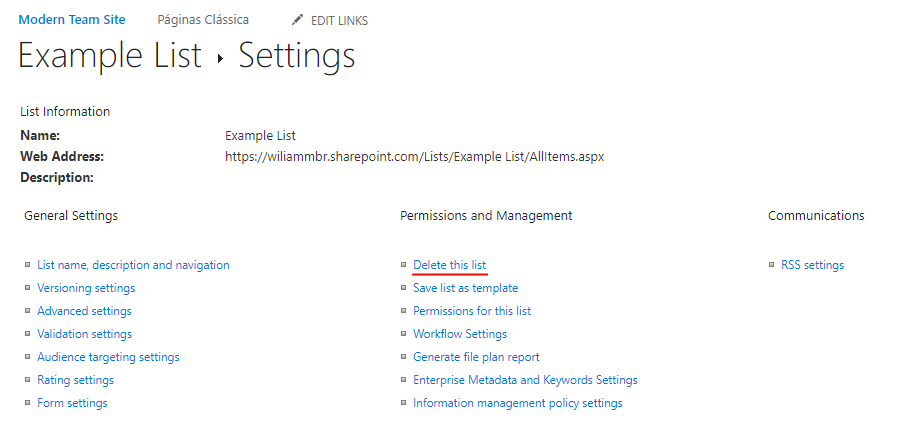
Finally click in Delete this list.
Accessing list settings in Modern experienceDelete the list
Excluding a list in Classic interface in SharePoint
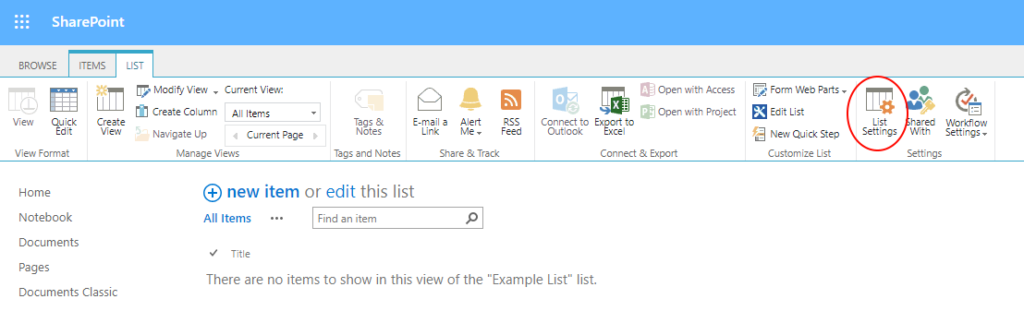
First you must be inside the SharePoint list;
After click in the tab called LIST;
Click in List Settings;
Finally click in Delete this list.
Accessing list settings in Classic ExperienceDelete the list
I hope this blog post could help you on learning how to delete a SharePoint list properly. Also, if you want to be more dramatic, you can learn how to delete a SharePoint site too.
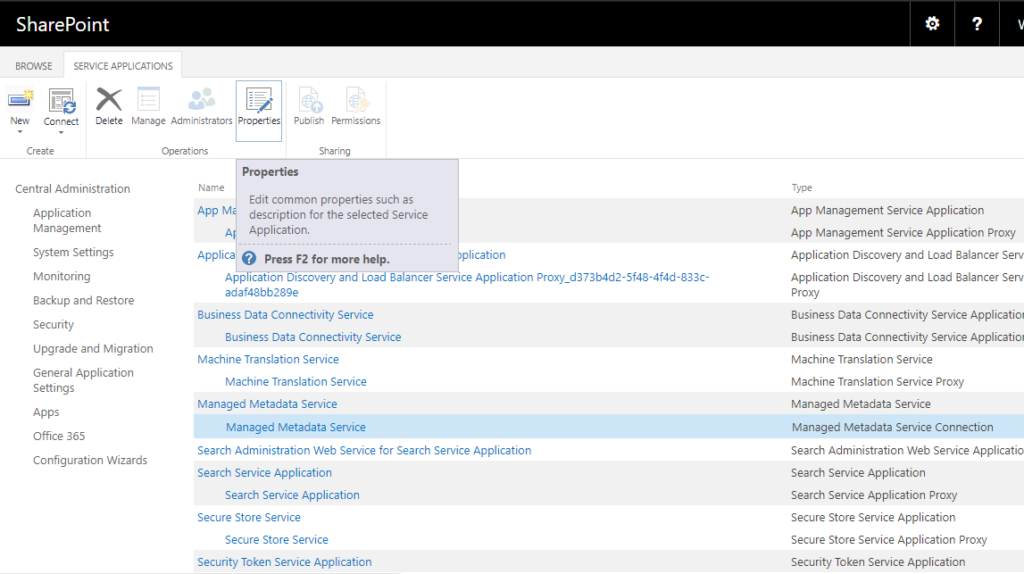
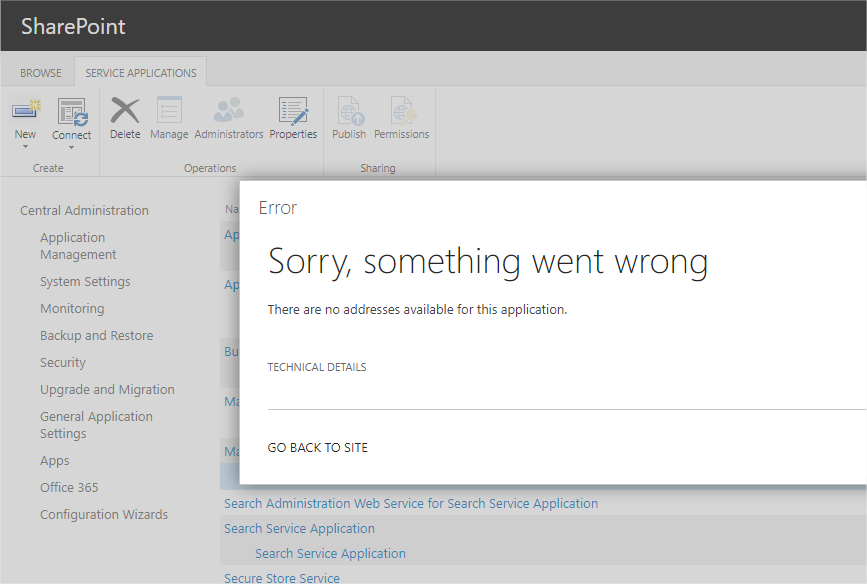
Sometimes the Managed Metadata Service can be tricky. In my opinion it’s one of the SharePoint services that are more delicate, showing up with a lot of error messages like the subject of this blog post. The There are no addresses available for this application in Managed Metadata can occur to you someday. It happened to me when I was going to setup some Service Connections via SharePoint Central Admin.
Opening Properties for the Managed Metadata Service
All of suddenly the error message appeared and it frustrated me a lot. My first Google search results were talking about the User Profile Service Application and they didn’t seemed to help that much.
This post will help you when you want to identify which W3WP belongs to which application. It comes in handy when we need to debug Visual Web Parts and Event Receivers deployed as Farm Solutions. The basic approach requires the user to open Visual Studio, attach the W3WP processes and refresh your page to start debugging.
Well, it’s pretty common in our daily life tasks (not so much since we all should move to the Client-side of the force) to have more than one W3WP available to attach. Usually we have one for your site, other for SharePoint Web Services, another for the SharePoint Central Admin and even more for any other Application Pool process being used in your Server.
But if you want to attach to just one process and make Visual Studio more performatic and responsive, how can you do that?
Actually I’ve decided to publish this one because the high number of page views for the last one. At the same time Microsoft launches SharePoint 2016 and keeps improving SharePoint Online, people still are looking for the SharePoint 2013 exams.
The last three months I’ve been working less with SharePoint and more with Angular 4/Node JS projects. This change forced me to use less Visual Studio and dive deep into Visual Studio Code in almost every task. I must say that I fell in love with the editor and decided to search about how to sync SharePoint files with VS Code.
While working with VSCode, I’ve been testing some Gulp tasks like SPSave and SPSync for automatizing file changes to SharePoint, just for fun. Because I just can’t accept SharePoint Designer anymore, my patience with it ran out.
Also the Windows feature to map a network drive to a SharePoint library isn’t good too, at least for me.
So basically the gulp tasks did the trick, but they aren’t that easy to be understood for some more “traditional” programmers in my company, which would end with few adopters here.
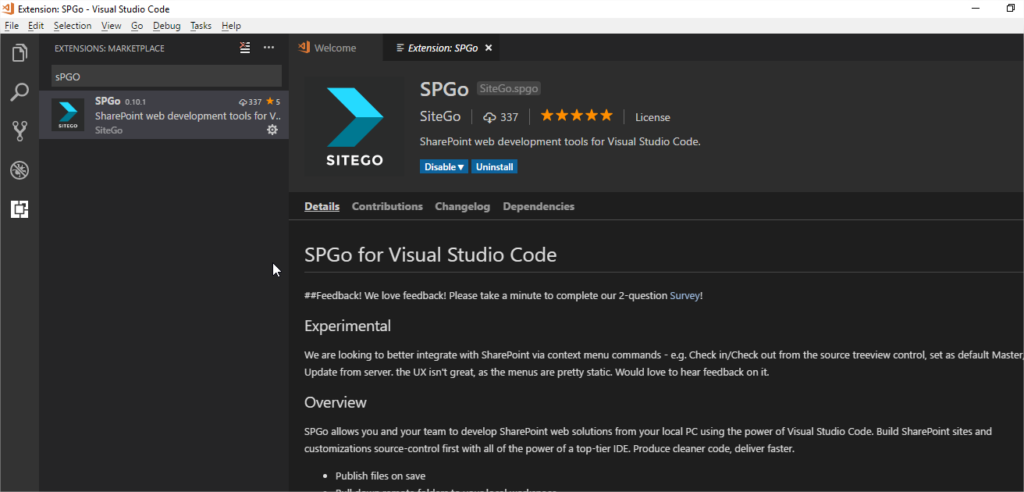
So while searching for SharePoint extensions just for curiosity, I found the SPGO Extension and it really impressed me!
Basically it’s an extension that with some basic setup you can start syncing files from your computer with SharePoint libraries.
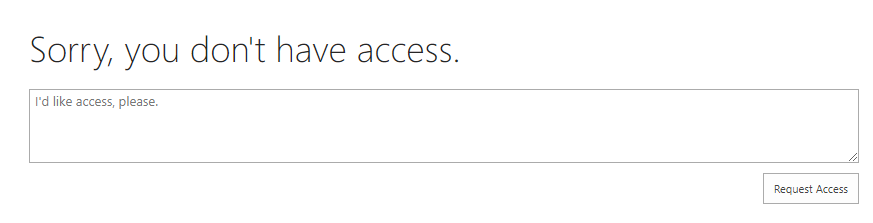
Sometimes you can face something like an error related to Access Denied when activating feature in SharePoint. It’s pretty common to happen when we are developing an automatized routine or anything that access SharePoint administration objects. As an example it can be Timer Job that will run in a specific schedule and you creates it on feature activation.
Sometimes it’s necessary to repair Lookup column in SharePoint. Usually it can happen when we need to transport a list from a Production environment to a Development environment, just to reproduce some bug or situation with real world data. This is possible when you use the Save as Template feature, exporting it from an environment to another and then you recreate the list.
But, if you have Lookup fields it can give you some headaches. As soon as the list is restored in the other environment, the Internal GUIDs will be changed forever and any connection to the source list of the lookup column will be lost!
But it’s important to emphasize that Lookup columns are great as Microsoft says that “You can create relationships between lists by using a combination of unique columns, lookup columns, and relationship enforcement (cascade and restrict delete), all of which enhance your ability to create more sophisticated business solutions and help preserve the integrity of your data.”.
This post will cover SPQuery best practices in SharePoint due to my recent experience with customers complaining about the performance of their SharePoint sites. This problem collaborated to create a bad impression of the product. “The page takes too long to load” or “Web Parts with pagination are terrible” were some of their complaints.
After the first contact with them, I usually asked for the source code to find out what was happening and do some troubleshooting. It didn’t take too much to find out that almost every case had performance issues due to queries being made with the SPList.Items property and followed by some LINQ query to filter the data.
Wiliam is from Porto Alegre, Brazil, currently working as DevOps Engineering Advisor at Dell EMC. He has been working with Microsoft technologies for almost ten years with one year gap studying abroad in Japan attending the Science without Borders program from the Brazilian government. Also he is MCSE Productivity, a SharePoint lover.
Nowadays he is investing the most part of his time on exploring GitLab and Azure DevOps features and helping the company to develop a DevOps culture among its colleagues.
In addition of that, he spends some time on learning Japanese, doing CrossFit and playing real-time strategy games like Age Of Empires. Read More…
This website uses cookies to improve your experience. We'll assume you're ok with this, but you can opt-out if you wish. Cookie settingsACCEPT
Privacy & Cookies Policy
Privacy Overview
This website uses cookies to improve your experience while you navigate through the website. Out of these cookies, the cookies that are categorized as necessary are stored on your browser as they are essential for the working of basic functionalities of the website. We also use third-party cookies that help us analyze and understand how you use this website. These cookies will be stored in your browser only with your consent. You also have the option to opt-out of these cookies. But opting out of some of these cookies may have an effect on your browsing experience.
Necessary cookies are absolutely essential for the website to function properly. This category only includes cookies that ensures basic functionalities and security features of the website. These cookies do not store any personal information.
Any cookies that may not be particularly necessary for the website to function and is used specifically to collect user personal data via analytics, ads, other embedded contents are termed as non-necessary cookies. It is mandatory to procure user consent prior to running these cookies on your website.




Recent Comments